
Why Retry Mechanisms Matter
In real-world Salesforce integrations, failures are not an exception—they are expected. Network glitches, timeouts, rate limits, or temporary outages can interrupt even the most well-designed systems. The goal is not to eliminate failures completely, but to handle them gracefully.
When I first worked on integrations, I used a very basic approach—retry immediately if something failed. It seemed fine at first, but under load, it made things worse. Systems became overwhelmed, and failures multiplied. That’s when I realized a retry mechanism needs to be designed carefully, not just added as a quick fix.
Identifying Retryable vs Non-Retryable Errors
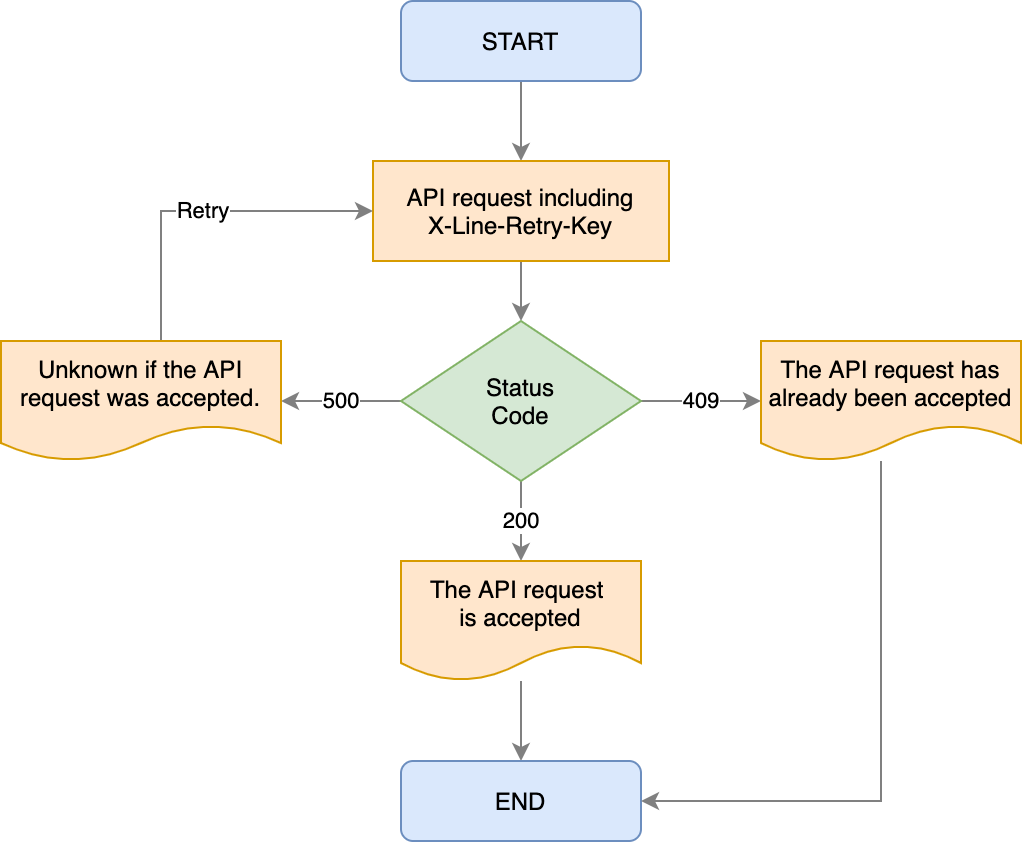
The first step is understanding which failures actually deserve a retry. Not every error should be retried.
Temporary issues like timeouts or server errors (HTTP 5xx) are usually safe to retry. But client-side errors (HTTP 4xx), such as invalid data or authentication issues, will keep failing no matter how many times you retry. Retrying these only wastes resources.
Handling this properly in your Apex layer ensures retries are triggered only when they have a real chance of success.
Choosing the Right Retry Strategy
A good retry mechanism is not about retrying fast—it’s about retrying smart.
Instead of retrying immediately, introduce a delay between attempts. Exponential backoff is a common strategy where the wait time increases after each failure—like 1 minute, 2 minutes, 4 minutes, and so on. This reduces pressure on external systems and improves recovery chances.
In Salesforce, since you can’t pause execution mid-transaction, this is typically handled using asynchronous approaches like Queueable Apex or scheduled jobs.
Leveraging Asynchronous Processing in Salesforce
Retries should never block user transactions. That’s where asynchronous processing comes in.
Queueable Apex is a strong choice because it allows chaining and passing context between jobs. For more advanced use cases, Platform Events or Batch Apex can be used. These patterns ensure that retries happen in the background without impacting user experience or hitting governor limits.
Designing a Retry Queue (Custom Object Pattern)
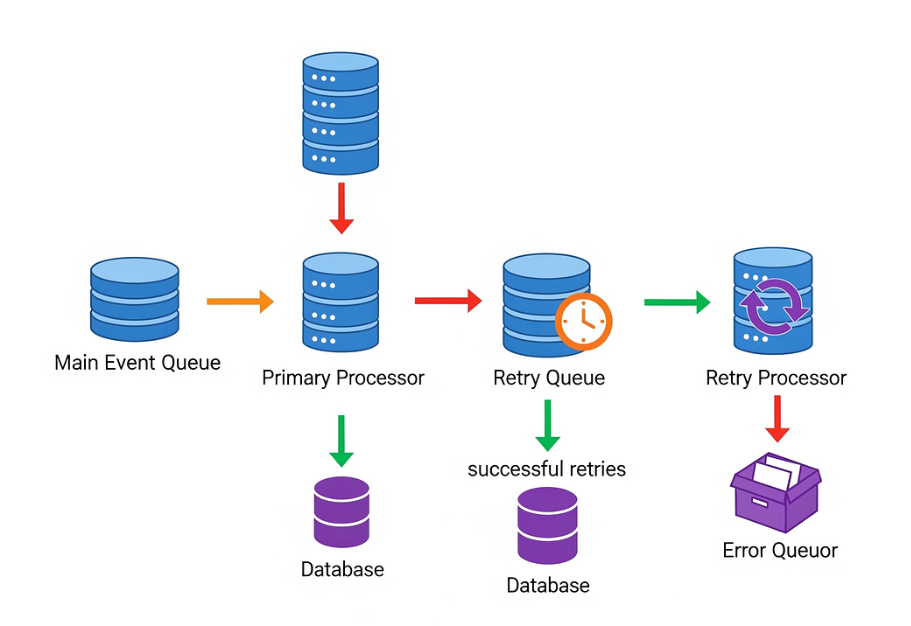
One practical approach is to store failed requests in a custom object—something like Retry_Queue__c.
Each record can hold details such as the request payload, retry count, last error message, and next retry time. A scheduled job periodically scans this object and retries eligible records.
This pattern gives you durability. Even if something interrupts processing (like deployments or system restarts), your retry data is safe and can resume later.
Handling Idempotency to Avoid Duplicates
Retries introduce a risk—duplicate processing.
If a request succeeds after multiple attempts, you don’t want it creating duplicate records in the target system. This is where idempotency becomes important.
The idea is simple: include a unique identifier with each request so that the receiving system can detect and ignore duplicates. Without this, retries can lead to inconsistent data.
Monitoring and Observability
A retry mechanism without visibility is hard to manage.
Every retry attempt and failure should be logged with meaningful details. Over time, this helps identify patterns—like repeated failures from a specific API or rate limits being hit frequently.
Simple Salesforce reports or dashboards on your retry object can provide valuable operational insights.
Setting Limits and Fallback Handling
Retries should not go on forever.
Define a maximum retry count—typically 3 to 5 attempts. If all retries fail, mark the record as failed and notify the relevant team. This prevents endless loops and ensures real issues are addressed promptly.
Final Thoughts
Designing a retry mechanism is not just about handling failures, it’s about designing for reliability from the start. In Salesforce integrations, where multiple systems interact, this becomes even more important.
A well-designed retry strategy can turn a fragile integration into a robust one. It gives your system the ability to recover, adapt, and continue functioning even when things don’t go as planned.
The next time you build an integration, don’t just think about the happy path. Ask yourself: What happens when this fails?
That’s where good architecture begins.
0 Comments