
Salesforce Large Data Volumes (LDV)
Modern Salesforce implementations often grow to millions or even billions of records. While Salesforce is highly scalable, handling Large Data Volumes (LDV) requires careful architectural planning. Without proper design, organizations may face slow queries, report performance issues, long batch processing times, and poor user experience.
This guide explores how Salesforce architects approach Large Data Volume management, including data modeling strategies, query optimization, indexing, and system architecture patterns that ensure scalable performance.
Understanding Large Data Volumes in Salesforce
Large Data Volumes generally refer to situations where Salesforce objects contain millions of records or when an organization processes very large datasets regularly.
Typical LDV scenarios include:
- Customer transaction history with millions of records
- Case management systems with long historical records
- IoT or event data stored in Salesforce
- Large activity or logging tables
- Marketing campaign data
While Salesforce can handle large datasets, performance challenges begin to appear when queries, reports, or integrations must process large portions of the data at once.
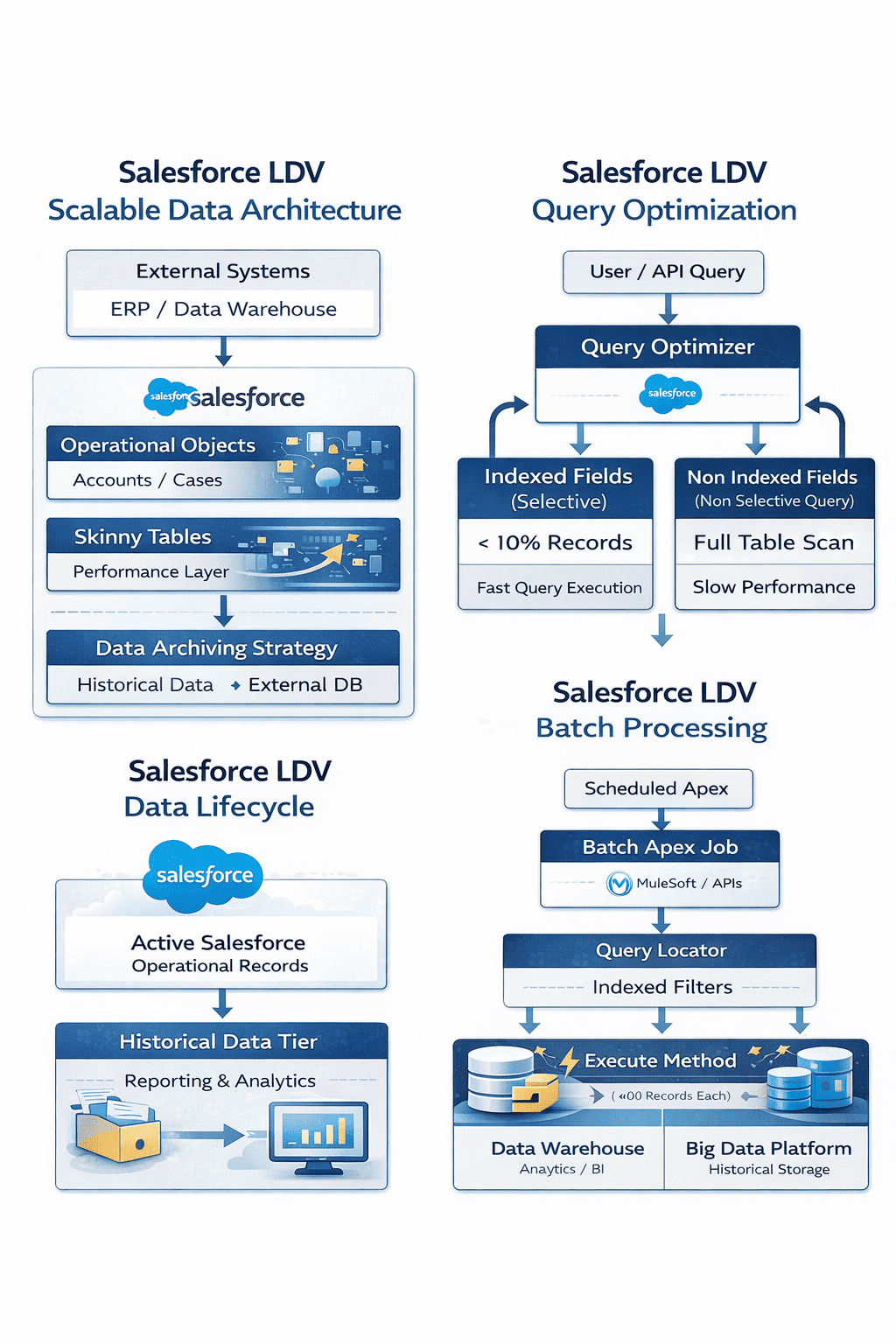
Why LDV Becomes a Challenge
When data grows significantly, several platform components are affected:
Query Performance : If queries scan too many records, response times increase.
Reporting : Reports that process large datasets may take longer to load or fail to execute efficiently.
Batch Processing : Scheduled jobs that process millions of records may exceed platform limits.
Data Storage : Organizations must manage both data growth and storage costs.
LDV Architecture Principles
Salesforce architects typically follow several key principles when designing systems for large datasets.
Design for Selectivity : Queries must filter records using selective criteria so that Salesforce does not scan the entire dataset.
Avoid Full Table Scans : Queries without filters or with non-selective filters cause performance issues.
Partition Data Logically : Data should be segmented based on meaningful business attributes such as region, status, or ownership.
Archive Historical Data : Older data that is rarely accessed should be archived or stored externally.
Indexing Strategies for LDV
Indexes play a critical role in improving query performance in Salesforce.
Standard Indexes
Salesforce automatically indexes fields such as:
- Record ID
- Name
- Lookup relationships
- Master-detail relationships
- Audit fields
These indexes improve query performance when used as filters.
Custom Indexes
Salesforce Support can create custom indexes on frequently queried fields.
These are commonly used on:
- External IDs
- frequently filtered custom fields
- status or category fields
Custom indexes significantly improve performance for large datasets.
Composite Indexes
Composite indexes combine multiple fields to optimize queries that filter using multiple criteria.
Example: Filtering by both AccountId and Status.
Selective Queries: The Key to LDV Performance
Query selectivity determines how efficiently Salesforce retrieves data.
A query is considered selective when it returns a small subset of records.
Example:
SELECT Id FROM Case
WHERE Status = ‘Open’
If “Open” cases represent only a small portion of the dataset, this query performs efficiently.
However, queries that return a large percentage of records may become slow.
Architects must design filters carefully to maintain query selectivity.
Data Archiving Strategies
One of the most effective LDV strategies is data archiving.
Many organizations retain years of historical data that is rarely accessed.
Instead of keeping all records in Salesforce, older data can be archived to external storage systems such as:
- Data warehouses
- Big data platforms
- Cloud storage solutions
Users can still access archived data through external applications or integrations when necessary.
Handling Large Data Operations with Bulk API and PK Chunking
When working with Large Data Volumes (LDV) in Salesforce, traditional APIs may struggle to process millions of records efficiently. To handle high-volume data operations such as migrations, integrations, and data synchronization, Salesforce provides the Bulk API, which is specifically designed for processing large datasets asynchronously.
Bulk API allows records to be processed in batches rather than one request at a time. This significantly improves performance when loading or extracting large datasets from Salesforce.
However, when the dataset becomes extremely large—often tens of millions of records—even Bulk API queries can take a long time to complete. This is where PK Chunking becomes a powerful optimization technique.
What is PK Chunking?
PK Chunking stands for Primary Key Chunking, a mechanism that divides a large query into multiple smaller queries based on the record Id (primary key). Since Salesforce record IDs are indexed and sequential, this allows the platform to split a large dataset into manageable chunks that can be processed in parallel.
Instead of running a single large query against millions of records, Salesforce automatically generates multiple smaller queries, each targeting a specific range of record IDs.
This dramatically improves performance when extracting large datasets.
How PK Chunking Works
Typical flow:
- A Bulk API query is initiated.
- PK Chunking divides the dataset based on record ID ranges.
- Each chunk is executed as an independent query.
- Results are processed in parallel.
- All chunks are combined to produce the final dataset.
This approach significantly reduces the time required to retrieve large volumes of records.
When to Use PK Chunking
PK Chunking is particularly useful in scenarios involving:
- Large data migrations
- Data warehouse synchronization
- Historical data extraction
- Backup and archival processes
- Analytics pipelines
It is most beneficial when working with objects containing millions of records.
Skinny Tables
Salesforce provides Skinny Tables as a performance optimization mechanism.
Skinny tables are custom tables maintained by Salesforce that contain frequently used fields from large objects.
Benefits include:
- Faster query performance
- Reduced table joins
- Improved report execution
However, skinny tables have some limitations and must be managed carefully with Salesforce support.
Batch Processing with Large Data Volumes
Batch Apex is commonly used to process large datasets.
However, architects must design batch jobs carefully to avoid performance issues.
Best practices include:
- Processing records in smaller batches
- Using indexed filters
- Avoiding queries without filters
- Using parallel processing when possible
Example batch execution:
Database.executeBatch(batchClass, 200);
Using a batch size of 200 helps balance performance and governor limits.
Asynchronous Processing for LDV
Processing large datasets synchronously can create performance bottlenecks.
Salesforce provides asynchronous tools that allow processing to occur in the background.
Common options include:
- Batch Apex
- Queueable Apex
- Scheduled Apex
- Platform Events
These mechanisms allow large workloads to run without impacting user operations.
Reporting Strategies for Large Data
Reports that process large volumes of data must be designed carefully.
Architects often recommend:
- Using filters to reduce dataset size
- Avoiding unnecessary joins
- Using summary reports instead of detailed reports
- Creating reporting snapshots
These approaches improve report performance while maintaining analytical capabilities.
Data Lifecycle Management
Effective LDV management requires a data lifecycle strategy.
Data typically moves through several stages:
- Active operational data
- Historical but occasionally accessed data
- Archived long-term storage
Managing this lifecycle ensures Salesforce stores only the data necessary for operational processes.
Monitoring Performance in LDV Environments
Salesforce provides tools to monitor query and system performance.
Important monitoring tools include:
- Query Plan Tool
- Event Monitoring
- Debug Logs
- Performance dashboards
These tools help architects identify slow queries and optimize system behavior.
LDV Architecture with External Systems
In many large enterprises, Salesforce works alongside data platforms designed to handle massive datasets.
A common architecture includes:
- Salesforce for operational processes
- Data warehouse for analytics
- Big data platforms for historical datasets
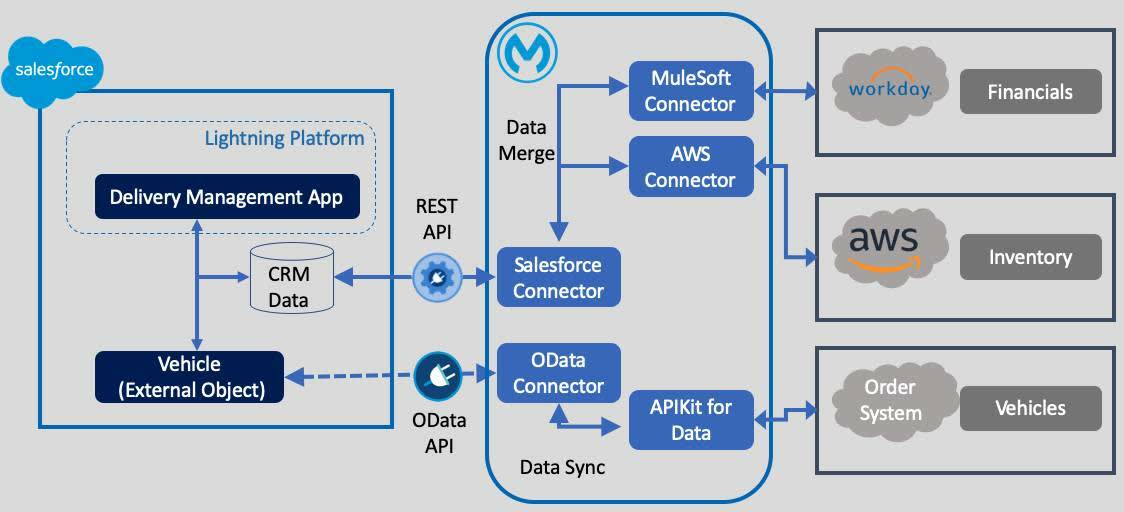
This hybrid architecture allows Salesforce to remain performant while still supporting advanced analytics.
LDV Best Practices Used by Salesforce Architects
Handling large datasets requires disciplined architecture practices. The following best practices are widely used by Salesforce architects working with high-volume environments.
1. Always Design Selective Queries
Queries should return less than 10% of the total dataset to avoid full table scans.
2. Use Indexed Fields for Filters
Use indexed fields such as:
-
Record Id
-
Lookup fields
-
External Ids
-
Custom indexed fields
3. Archive Historical Data Regularly
Move rarely used data to:
-
Data warehouses
-
Data lakes
-
External storage systems
4. Avoid Unfiltered Reports
Reports scanning millions of records will degrade performance.
Always apply strong report filters.
5. Use Skinny Tables for High-Traffic Objects
Skinny tables improve performance for frequently accessed large objects.
6. Process Data Asynchronously
Use asynchronous tools such as:
-
Batch Apex
-
Queueable Apex
-
Platform Events
7. Partition Data Logically
Segment data by attributes like:
-
region
-
date range
-
status
This improves query selectivity.
8. Avoid Negative Filters
Queries using filters like
are usually non-selective.
Use positive filters instead.
9. Monitor Query Performance
Use tools such as:
-
Query Plan Tool
-
Event Monitoring
-
Debug Logs
to identify slow queries.
10. Combine Salesforce with External Data Platforms
Large enterprises typically use Salesforce together with:
-
Data warehouses
-
Analytics platforms
-
Big data environments
This hybrid architecture supports both operational CRM and large-scale analytics.
0 Comments