
The Reality of Enterprise Salesforce
In most organizations, Salesforce is only one piece of a much larger technology landscape. Customer interactions might start in Salesforce, but the actual data and processing often live elsewhere — in ERP systems, payment platforms, marketing tools, telephony systems, or analytics platforms.
Because of this, Salesforce architects spend a significant amount of time thinking about how systems talk to each other.
Not every integration should work the same way. Some require an immediate response, while others can run in the background without blocking users.
The goal is to design integrations that are:
-
Reliable
-
Scalable
-
Secure
-
Easy to evolve as systems change
This blog explores the key integration patterns used in Salesforce and how they fit into a modern architecture.
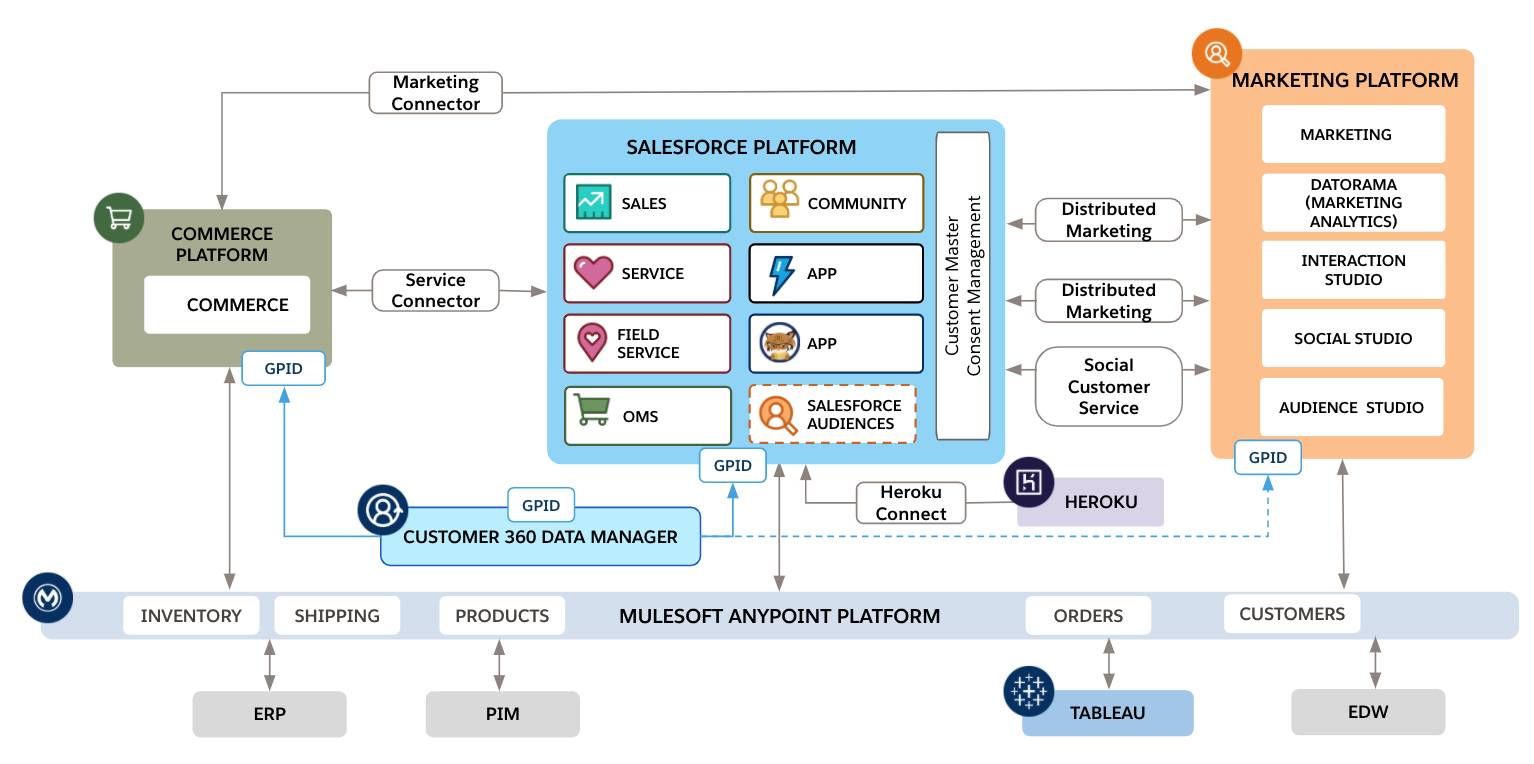
In most companies, Salesforce acts as the system of engagement — where users interact with customer data. However, other systems usually remain the systems of record.
Examples include:
-
ERP systems managing orders and invoices
-
Payment gateways processing transactions
-
Telephony systems handling calls
-
Marketing tools managing campaigns
-
Data platforms analyzing customer behavior
The architect’s challenge is ensuring these systems exchange information efficiently and safely.
Two Main Integration Approaches
Most integrations fall into two broad categories.
Synchronous : Salesforce waits for a response
Asynchronous : Salesforce sends a request and continues
These approaches map to two commonly used integration patterns.
1. Remote Process Invocation — Request & Reply
2. Remote Process Invocation — Fire & Forget
Understanding when to use each one is an important architectural decision.
Pattern 1: Request & Reply (Synchronous Integration)
This pattern is used when Salesforce must wait for an answer before continuing.
For example, if a user clicks “Pay Now”, Salesforce needs to know whether the payment succeeded before confirming the transaction.
The flow typically looks like this:
- A user action triggers a process in Salesforce
- Salesforce calls an external API
- The external system processes the request
- The response returns to Salesforce
- Salesforce continues the transaction
Because everything happens within a single interaction, performance matters a lot.

Common Real-World Examples
This pattern is usually used when immediate validation or calculation is required.
Typical scenarios include:
Payment Authorization : Salesforce checks with a payment gateway before confirming a transaction.
Real-Time Pricing : Some organizations maintain complex pricing engines outside Salesforce.
Credit Checks : Financial services companies validate customer credit scores in real time.
Inventory Validation : Before creating an order, Salesforce checks if stock is available.
Implementing Request & Reply in Salesforce
Apex Callouts
Apex provides full control over HTTP requests and responses.
This approach is useful when: APIs are complex, custom logic is required and response transformation is needed
Named Credentials
Named Credentials help manage endpoints and authentication securely.
Instead of writing authentication logic in code, Salesforce handles it automatically.
Benefits include: Secure credential storage, Built-in OAuth support and Cleaner integration code
Flow HTTP Callouts
For simpler integrations, Salesforce Flow allows HTTP callouts without writing Apex.
This is especially helpful when integrations are relatively straightforward.
Challenges with Synchronous Integrations
Synchronous integrations are powerful, but they come with risks.
Latency
Users must wait for the external system to respond.
Slow APIs directly impact the Salesforce user experience.
Dependency
If the external system is unavailable, the Salesforce process may fail.
Platform Limits
Salesforce enforces limits on the number of API callouts per transaction.
Architects must avoid patterns like calling an external API inside a loop.
Pattern 2: Fire & Forget (Asynchronous Integration)
Fire & Forget is an asynchronous integration model.
Instead of waiting for a response, Salesforce simply sends a message and continues processing.
The receiving system processes the request independently.
This approach works well for high-volume or non-critical processes.
Example: Order Creation
Imagine a sales representative creates an order in Salesforce.
The order must also appear in the ERP system.
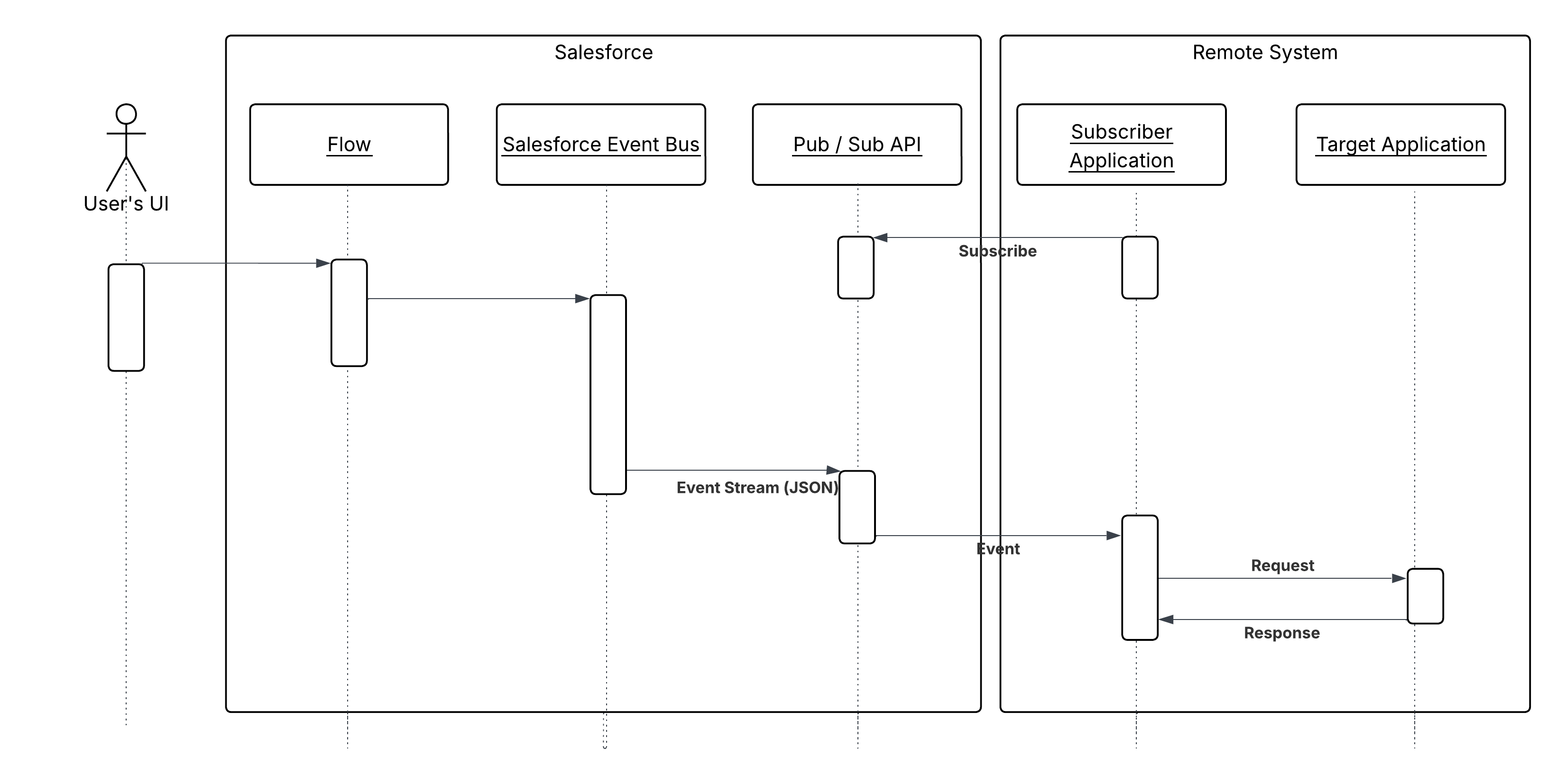
Instead of waiting for ERP confirmation, Salesforce simply publishes an event.
ERP picks up the message and processes it in the background.
This keeps the Salesforce user experience fast and responsive.
Event-Driven Architecture in Salesforce
Event-Driven Architecture (EDA) is becoming a widely adopted integration approach in modern enterprise systems. Instead of systems communicating through tightly coupled synchronous APIs, event-driven systems exchange information through events that represent business activities. An event simply indicates that something has happened within a system. Examples include events such as Order Created, Customer Updated, Payment Completed, or Case Closed. When such an activity occurs, the system that generated the event publishes it so that other systems can react accordingly. In this model, Salesforce does not need to directly call every external system. Instead, it publishes events that interested systems can subscribe to and process independently.
Core Components of Event-Driven Architecture
An event-driven architecture typically consists of three primary components that enable communication between systems: the event producer, the event bus or message broker, and the event consumers.
The event producer is the system that generates and publishes an event. In many integration scenarios, Salesforce acts as the producer when a business action occurs. For instance, when a new order is created in Salesforce, the platform can publish an OrderCreated event.
The event bus or message broker acts as the central channel that distributes events to other systems. Examples of event buses include the Salesforce Event Bus, Kafka, MuleSoft messaging platforms, or other enterprise streaming technologies.
The event consumers are the systems that subscribe to these events and perform actions when they receive them. These could include ERP systems updating inventory, billing systems generating invoices, or analytics platforms recording transactions. A key advantage of this architecture is that the event producer does not need to know who the consumers are. It simply publishes the event, and the event bus ensures that all interested systems receive it.
Example: Order Processing Using Events
Consider a common enterprise scenario where a new order is created in Salesforce. Several systems may need to react to that event. Instead of Salesforce making multiple API calls to each system, it publishes a single event.
Once the event is published, the event bus distributes it to all subscribed systems. The ERP system might update inventory levels, the billing system might generate an invoice, and an analytics platform might record the transaction for reporting purposes. Each system processes the event independently without affecting others. This significantly reduces integration complexity and avoids creating long chains of synchronous API calls.
Advantages of Event-Driven Architecture
Loose Coupling Between Systems
One of the major advantages of event-driven architecture is loose coupling. In traditional integrations, systems need to know exactly which systems they are communicating with and how the APIs behave. In an event-driven approach, Salesforce simply publishes events without needing to know which systems will consume them. This allows systems to evolve independently without requiring changes in Salesforce.
Improved Scalability
Event-driven architecture scales naturally because multiple systems can consume the same event simultaneously. For example, a CustomerUpdated event might trigger updates in marketing automation tools, data warehouses, and customer support systems. Salesforce only publishes the event once, and the event bus distributes it to all relevant consumers.
Increased System Resilience
Event-driven architectures are also more resilient. If one consumer system is temporarily unavailable, the event can still be processed later when the system becomes available again. This prevents failures in one system from interrupting the entire business process, which is a common issue in synchronous integrations.
Near Real-Time Processing
Events can be processed almost instantly, allowing systems to react quickly to business activities. This enables real-time analytics, automation, and faster business insights.
Event-Driven Capabilities in Salesforce
Salesforce provides several built-in features that support event-driven integration patterns.
Platform Events
Platform Events allow Salesforce to publish custom business events to the Salesforce Event Bus. External systems and other Salesforce components can subscribe to these events and react to them in near real time. Platform Events are widely used for integrating Salesforce with middleware platforms and external services.
Change Data Capture (CDC)
Change Data Capture automatically publishes events whenever records in Salesforce are created, updated, deleted, or restored. These events can be consumed by external systems to keep their data synchronized with Salesforce.
Streaming API
The Streaming API allows external applications to subscribe to Salesforce events such as Platform Events or Change Data Capture events. This enables external platforms to receive real-time updates whenever important business activities occur in Salesforce.
Key Design Principles for Event-Driven Systems
When implementing event-driven architectures, architects must follow several design principles to ensure reliability and scalability.
Event Design
Events should represent business outcomes rather than technical actions. For example, an event called OrderCreated clearly communicates a business activity, while something like SendOrderAPI focuses on technical implementation. Designing events around business meaning makes them easier to understand and reuse across multiple systems.
Idempotency
Because event delivery systems may sometimes resend messages due to retries or network issues, consuming systems must be able to handle duplicate events safely. Idempotent design ensures that processing the same event multiple times does not result in duplicate records or inconsistent data.
Eventual Consistency
Event-driven architectures operate under the principle of eventual consistency. Data updates may not propagate instantly across all systems. Instead, events ensure that all systems eventually reach the same state. For example, Salesforce may publish an event immediately after an order is created, while the ERP system might process it a few seconds later.
Role of Middleware in Event-Driven Architecture
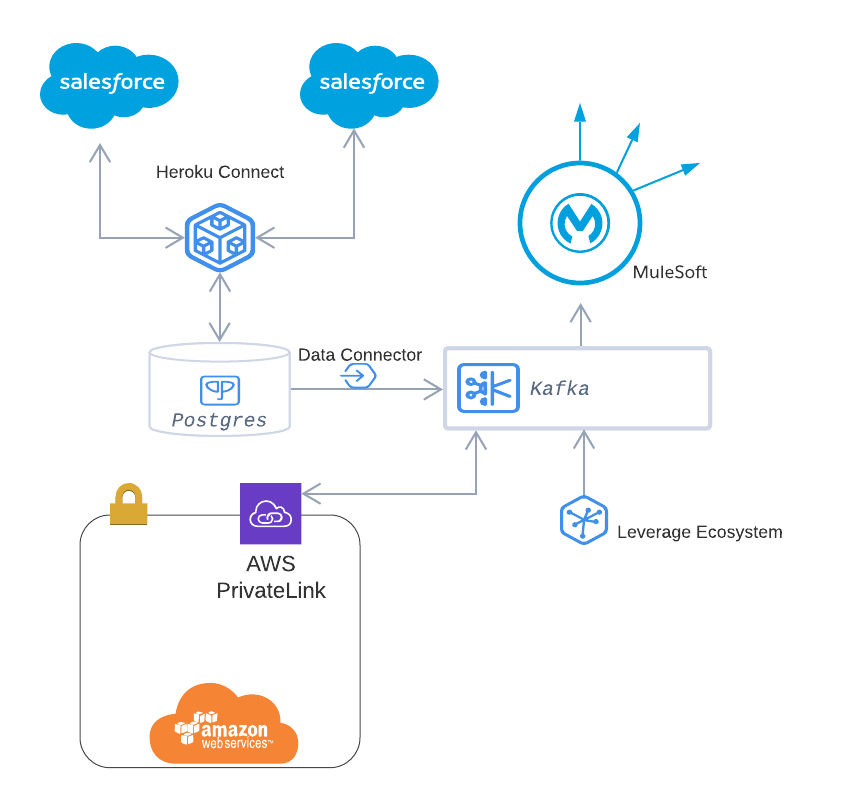
In large enterprise environments, middleware platforms often sit between Salesforce and other enterprise systems. Platforms such as MuleSoft, Kafka, or other event streaming technologies manage the flow of events across systems. Middleware helps with event routing, message transformation, retry mechanisms, monitoring, and logging.
This integration layer also provides better visibility into event flows and simplifies the management of complex enterprise integrations.
When to Use Event-Driven Architecture
Event-driven architecture works best when multiple systems need to react to the same business event, when high scalability is required, or when processes do not require immediate responses. It is particularly useful in distributed architectures where systems must remain loosely coupled.
However, for processes that require immediate validation or responses—such as payment authorization or credit checks—synchronous request-reply integrations may still be more appropriate.
Securing Integrations with External Credentials
Security plays a critical role in Salesforce integrations. When Salesforce communicates with external systems—such as ERP platforms, payment gateways, telephony services, or middleware platforms—it must authenticate itself securely. Traditionally, developers handled authentication by storing credentials or tokens directly in Apex code or custom settings. However, this approach introduces security risks, makes credential management difficult, and increases maintenance overhead.
To address these challenges, Salesforce introduced External Credentials, which provide a secure and flexible way to manage authentication for outbound integrations. External Credentials separate authentication configuration from application logic, allowing architects and administrators to manage security centrally while keeping integration code clean and maintainable.

External Credentials work together with Named Credentials to provide a complete authentication framework for external integrations. In this architecture, the Named Credential represents the external endpoint, while the External Credential defines how authentication should occur. When Salesforce performs an API callout, it references the Named Credential, which internally uses the External Credential to authenticate with the external service.
How External Credentials Work
The authentication process using External Credentials typically follows a structured flow. When an integration request is initiated from Salesforce, the callout references a Named Credential that contains the endpoint URL and configuration details. The Named Credential is linked to an External Credential, which defines the authentication mechanism required by the external service. The External Credential communicates with an identity provider or authorization server to obtain an access token. Once the token is generated, Salesforce attaches it to the outgoing request and securely calls the external API.
This design ensures that sensitive information such as client secrets, tokens, or authentication headers are never hardcoded in application logic. Instead, they are stored securely within the Salesforce platform and managed through configuration.
Authentication Methods Supported
External Credentials support multiple authentication mechanisms that are commonly used in enterprise integrations. One of the most widely used methods is OAuth 2.0, where Salesforce authenticates with an identity provider to obtain an access token before calling the external API. OAuth is commonly used when integrating with modern cloud services that require token-based authentication.
Another supported approach is JWT-based authentication, where Salesforce generates a signed JSON Web Token and exchanges it for an access token with the external identity provider. This approach is frequently used for server-to-server integrations where no user interaction is required.
External Credentials can also support simpler authentication methods such as API keys or custom headers, where the external service expects a specific header value to authenticate requests. By storing these configurations in External Credentials, Salesforce ensures that sensitive values remain protected and centrally managed.
Identity Models Using Principals
External Credentials introduce the concept of principals, which define the identity used when Salesforce authenticates with an external system. There are two main principal models that architects can choose from depending on the integration requirements.
Named Principal
In the Named Principal model, all Salesforce users share a single authentication identity when calling the external system. This identity usually represents a dedicated integration account created in the external system. Because all requests use the same credentials, this model is commonly used for system-to-system integrations.
For example, when Salesforce sends order information to an ERP system, the ERP may only need to know that the request is coming from Salesforce as a trusted system rather than from a specific user. In this scenario, the Named Principal model simplifies authentication and reduces the complexity of managing individual user credentials.
Per-User Principal
The Per-User Principal model allows each Salesforce user to authenticate with the external system using their own credentials or tokens. When a user initiates an action that triggers an API callout, Salesforce uses that user’s identity to authenticate with the external system.
This model is particularly useful in scenarios where actions must be performed on behalf of the user. For instance, in telephony integrations or third-party collaboration platforms, the external system may need to identify which specific user initiated the action. By using per-user authentication, Salesforce ensures that the external system can track activity at the user level.
Benefits of Using External Credentials
External Credentials provide several advantages for enterprise integration architectures. One of the most important benefits is improved security. Because authentication details are stored in a centralized configuration instead of code, sensitive credentials are protected and easier to manage.
Another advantage is separation of concerns. Developers can focus on building integration logic without worrying about authentication details. At the same time, administrators can update authentication settings without modifying the underlying code.
External Credentials also improve maintainability and flexibility. If authentication requirements change—such as updating a token endpoint or rotating credentials—these changes can be made directly within the credential configuration rather than requiring application redeployment.
Finally, External Credentials support scalability in enterprise environments. Organizations can manage multiple external systems, each with different authentication requirements, through a consistent and centralized framework.
Role in Modern Integration Architecture
External Credentials have become an important component of modern Salesforce integration architectures. As organizations adopt API-driven and event-driven integration models, secure authentication becomes even more critical. By combining External Credentials with Named Credentials, Salesforce provides a secure mechanism for managing outbound integrations across multiple systems.
This approach aligns with enterprise security best practices by ensuring that authentication logic is centralized, configurable, and independent from application code. It also simplifies governance and auditing, since administrators can clearly see which integrations exist and how they authenticate with external systems.
Key Design Principles
Good integration architecture follows a few core principles.
Loose Coupling
Systems should interact through APIs or events without depending on each other’s internal implementation.
Idempotency
External systems must safely handle duplicate messages.
Processing the same event twice should not create duplicate records.
Eventual Consistency
In asynchronous systems, data may not update instantly across systems.
However, over time all systems reach the same state.
Observability
Architects must ensure integrations are monitored and failures are visible.
Monitoring helps teams detect and resolve issues quickly.
Hi, this is a comment.
To get started with moderating, editing, and deleting comments, please visit the Comments screen in the dashboard.
Commenter avatars come from Gravatar.